
ADVERTISEMENT
ADVERTISEMENT
The Microsoft OneDrive app is an essential cloud storage solution designed to securely protect, sync, and make your photos, videos, and files accessible from any device. With a user-friendly interface, it caters to individuals and families who seek a reliable way to store and share their digital content. By offering robust security features and seamless integration with other Microsoft services, OneDrive stands out as a trustworthy option for managing your digital life. 📱
Downloading the Microsoft OneDrive app transforms how you manage your files. The app provides a generous initial offering of free storage (5 GB) and an option to upgrade to up to 1 TB with a Microsoft 365 subscription. Recent updates have enhanced its photo backup functionality and security measures, including ransomware detection and personal vault features. With Microsoft OneDrive, collaboration is a breeze, thanks to its real-time editing capabilities when used with Microsoft Office apps. Don't miss out on this secure platform for all your important files! 🌟
▪ Automatic Photo Backup: Ensures that your cherished memories are backed up securely without any effort.
▪ Secure File Sharing: Share links and files with friends and family while controlling access with password protection and expiration settings.
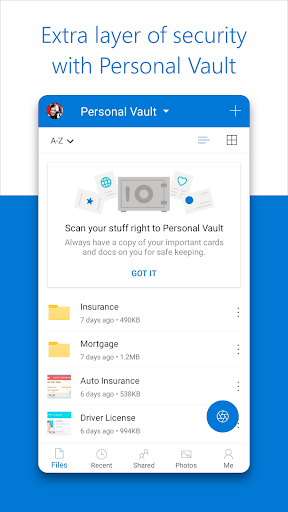
▪ Personal Vault: A secure folder for your important documents that requires identity verification for access.
▪ Version History: Easily restore previous file versions to recover lost information or undo changes.
▪ Offline Access: Access selected OneDrive files without an internet connection for greater convenience.
1. To get started, download the Microsoft OneDrive app from the App Store (for iOS) or Google Play (for Android) and install it on your device.
2. Once installed, open the app and sign in with your Microsoft account or create a new one if you don’t have it yet.
3. Start browsing your files or upload new photos, videos, and documents by tapping the upload button.
4. Enable automatic photo backup by turning on the "Camera Upload" feature for hassle-free storage of your mobile photos.
5. To share files with others, select the file you wish to share and follow the prompts to create a secure link or send an invite directly through the app.
By following these steps, you’ll quickly harness the full potential of the Microsoft OneDrive app, ensuring your files are safe, accessible, and well organized! 🚀




ADVERTISEMENT


Welcome to Zorapin - your go-to destination for downloading the latest and most popular Android apps. Our mission is to provide a safe, reliable, and user-friendly platform for Android users to discover and download the best apps.
At Zorapin, our top priority is to deliver top-notch content that is relevant to our users. Our team of experts carefully selects and reviews each app before it is available for download on our platform. We also regularly update our app library to ensure our users can access the latest versions of their favorite apps.
At Zorapin, we provide a wide range of high-quality apps that cater to all your needs. Our platform is continuously updated with the latest and hot apps, ensuring users can access the most up-to-date apps.
We prioritize providing a seamless and hassle-free app download experience. Our website is easy to navigate, and our download process is quick and secure.
Thank you for choosing Zorapin as your trusted source for Android apps. We hope you enjoy using our platform and welcome your feedback and suggestions.


